Meta title and description length: what Google really cuts
Updated October 12, 2026 · 6 min read · 6 sections

You trim a title tag to exactly 60 characters, the character counter turns green, and Google still shows it cut in the middle of a word. The number was never the rule. Google cuts a title or a description to fit the width of the screen, and how many letters fit in that width depends on which letters they are.
Nearly every title and meta description I edit has the same two problems: the important words sit at the end, and the writer was aiming at a number Google never published. Fix both and the exact count stops mattering much. The character counter on this site has a title and description check with a preview that clips by width, because a bare count cannot show you which words are lost.
What Google actually says
Read the two official pages and the 60 and 160 vanish. On snippets, Google says there is no limit on the length of a meta description, and that the snippet is truncated as needed, typically to fit the device width. On title links, the same: no limit on the title element, and the title link is shortened to fit the device width.
Two more points matter in practice:
- The snippet is not guaranteed to be your description. Google may build it from the page text when that matches the search better.
- The title link is not guaranteed to be your title. Google builds it automatically and can draw on the main visible title and headings of the page as well as the title element.
So you are writing a proposal, not an order. A good proposal is short enough to survive, specific to the page, and different from every other page on the site.
Where 60 and 160 come from
They are rules of thumb that SEO guides settled on after watching where results got clipped. Useful, but not Google rules. The guides also suggest that a description is cut earlier on phones, with about 120 characters surviving, which is the figure I plan around. I treat the numbers like this:
| Element | Band I aim for | Google's own rule |
|---|---|---|
| Title | 50 to 60 characters, key words first | No limit; shortened to fit the width |
| Description | 120 to 160 characters, the point inside the first 120 | No limit; truncated to fit the width, may be rewritten |
A 75-character title is not penalised for being 75. It may simply end in an ellipsis, and whatever you put after the cut is wasted.
Characters are a proxy for width
Letters are not the same size. A row of capital M and W letters takes far more room than a row of i, l and t, so two titles with an identical count can end up with different widths, and the wider one gets clipped first. Chinese, Japanese and Korean characters are full-width and take roughly the room of two Latin letters, so a title in those scripts holds fewer of them.
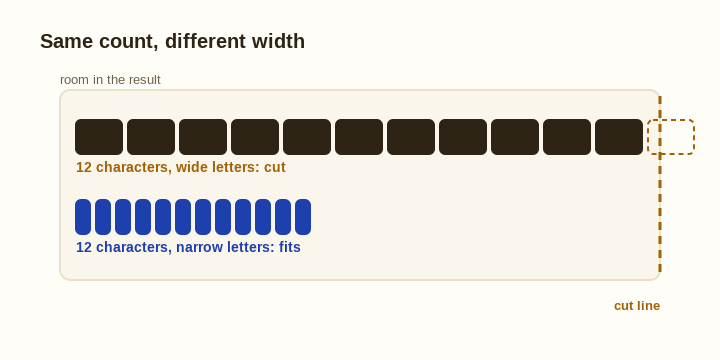
This is why I do not chase the last character. If a title is 58 characters of narrow letters it is fine, and if it is 52 characters of capitals and wide letters it may already be clipped on a phone. Staying under the band by a few characters is cheap insurance, and a preview that clips by width tells you more than the count does.
Front-load the words that earn the click
Whatever the width, the right-hand end is what gets lost, so the order of words does the real work. Take this pair, which I use as the standard example:
- Title (50 characters):
Character Counter: Limits for X, SMS and Meta Tags. The key phrase is first. If a phone clipped the end, the loss would be "Meta Tags", not the thing the page is about. - Description (147 characters):
Count characters, words and SMS segments as you type. See how X, Bluesky, Google Ads and SMS really count emoji, links and accents before you post.
Cut the description at 120 characters and it ends at "links a", but the first sentence, 53 characters, already says what the page does. The second sentence is a bonus for readers who see the full width. That is the pattern: put the complete message first, then the extras.
The controls you do have
You cannot set a length, but you can limit what Google shows. The robots directive max-snippet:[number] caps the snippet at a number of characters, nosnippet removes the text snippet altogether, and the data-nosnippet attribute keeps a marked part of the page out of the snippet. All three are described on Google's snippet page. I use them for pages where a snippet would give away the content, not as a way to shorten descriptions: nosnippet leaves a bare title and URL with no sentence to attract a click.
A checklist before you publish
- Put the key phrase first in the title, and the brand last or leave it out.
- Stay inside 50 to 60 characters for the title, and treat 60 as a ceiling for wide letters, not a target.
- Write the description as one complete message in the first 120 characters.
- Use plain punctuation. Straight quotes and plain dashes keep the same text reusable in an SMS or an ad without surprises.
- Make every page different. Identical titles or descriptions across a site tell Google and readers nothing.
- Check the heading too. If the visible H1 says something different from the title, Google may prefer the H1.
- Look at the live result after it is indexed, and if the snippet is not your description, check whether the page text answers the search better.
The same fit-the-box thinking applies to posts and ads, covered in character limits by platform, and to text messages, in the SMS character limit guide. For essays and speeches the unit is words, which the guide on how many pages is 1,000 words turns into pages and minutes.
Common questions
How many characters should a meta title be?
Aim for about 50 to 60 characters with the key words first. That is a rule of thumb, not a Google limit; Google shortens a title link to fit the device width.
How long should a meta description be?
About 120 to 160 characters, with the whole message inside the first 120 so it survives on phones. Google sets no fixed limit and may write its own snippet from the page.
Why does Google show a different title or description than the one I wrote?
Both are generated automatically. Google can build a title link from visible headings and prominent text, and it can build a snippet from the page text when that fits the search better.
Is the character count or the pixel width what matters?
Width. Wide letters such as M and W take more room than i or l, and Chinese, Japanese and Korean characters take about two Latin letters, so the count is only an approximation.
Can I stop Google from showing a snippet?
Yes: the nosnippet directive removes it, max-snippet caps its length, and data-nosnippet hides marked parts of the page. These are described on Google's snippet documentation page.


